Verisoft framework utilizes the Spring library to make it super easy to use and add properties.
General Instructions
In order to be able to use the built-in properties (like external URL) you will need to do the following:
- Extend your test with SpringContext.class
- Define a ContextConfiguration annotation sent to EnvConfig.class
- @Autowired your property
In addition, in case you want to extend and add properties of your own you will need to do the following:
- Add property to the property file
- Create a class that loads the property
- @Autowired the class in your test class
Some more information about the Spring framework and the dependency injection mechanism can be found here.
Using the external URL property
Built into the framework there is support for external use of the driver URL.
Take a look at the src/test/application.properties file. You can see there is a property named driver.url:
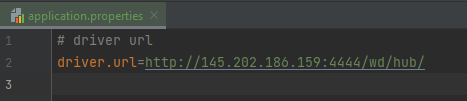
this is a definition of the driver we want to use. Note! If you just want to use your local driver set this value to null, or simply do not put the @DriverURL annotation in your tests.
Next, here is the code:
@Slf4j
@ExtendWith(SpringExtension.class)
@ContextConfiguration(classes = {EnvConfig.class})
public class PropertyFileLoaderTest extends BaseTest{

    @Autowired
    @DriverUrl
    private URL url;

    @DriverCapabilities
    private DesiredCapabilities capabilities = new DesiredCapabilities();
    {
        ChromeOptions options = new ChromeOptions();
        options.addArguments("--no-sandbox");
        options.addArguments("--headless");

        capabilities.setBrowserName("chrome");
        options.merge(capabilities);
    }

    @Test
    @DisplayName("Injected URL")
    public void injectedURL(VerisoftDriver driver) throws InterruptedException {
        driver.get("https://www.wikipedia.org/");
        Report.info("Loaded page from a url found in application.properties");
    }
}
Specifically, you can see in lines 2-4:
@ExtendWith(SpringExtension.class) - This tells Junit 5 that spring is involved in the process
@ContextConfiguration(classes = {EnvConfig.class}) - This tells JUnit 5 where to look for the root configuration file. This root config file will locate all the other config files. Specifically, it will locate the SeleniumConfig.class which is in charge of loading the URL property definition.
Next, we will define the URL in our code. Lines 6-8 do exactly that:
@Autowired- This tells Spring that the next variable should be located using the Spring framework
@DriverUrl- This tells the Verisoft framework that the URL field below should be injected into the VerisoftDriver instance.
private URL url- The actual URL to be used
Next, we will demonstrate how to define your own property file.