In this page we will describe the basics of Verisoft Framework support of page objects. We assume you are familiar with the page object concept, and read at least one of the basic UI testing pages - either web UI basic test or mobile UI basic test.
Verisoft framework defines the following hyrarchy:
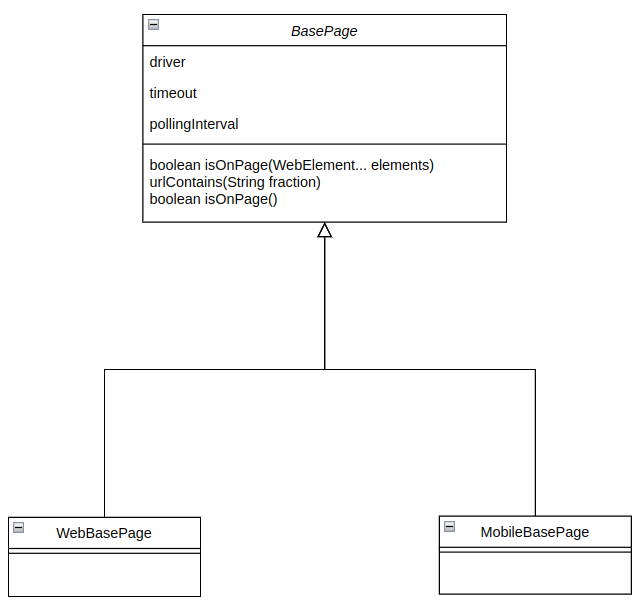
BasePage is an abstract class. It holds the WebDriver object, and some time related fields. It means each page object in the system should implement the method isOnPage(). In addition, the BasePage is in charge of PageFactory initialization for both web and mobile, so you don’t have to worry about that. For WebBasePage objects - that's it. The rest is designed as a regular page object.
For MobileBasePage there are a few additional methods - swipes and scrolls.
In order to use the page object, all you need to to do is to extend the relevant base page. for web UI tests it looks like public class WikipediaMainPage extends WebBasePage and for mobile UI tests it looks like public class MobileChromeWelcomePage extends MobilebBasePage.
An example for a typical mobile page object will look like this:
public class MobileChromeWelcomePage extends MobileBasePage {

    @AndroidFindBy(id = "com.android.chrome:id/terms_accept")
    @iOSXCUITFindBy(id = "SOME IOS ID")
    private WebElement accept;


    public MobileChromeWelcomePage(WebDriver driver) {
        super(driver);
    }


    @Override
    public boolean isOnPage() {

        // Verisoft wait object
        return Waits.visibilityOf(driver, timeOut, accept).isDisplayed();
    }


    public MobileChromeTurnOnSyncPage accept(){
        this.accept.click();
        return new MobileChromeTurnOnSyncPage(driver);
    }
}
Note that when implementing isOnPage method, we use Verisoft wait object. I simply provides a shorter way to define waits, with the exact same functionality as the Selenium wait object.
A typical web UI page object will look like this:
public class WikipediaMainPage extends WebBasePage {

    @FindBy(id = "searchInput")
    private WebElement searchBar;

    public static final String pageUrl = "https://www.wikipedia.org/";


    /**
     * C-tor. Initializes generic properties such as timeOut and pollingInterval
     *
     * @param driver a WebDriver object to store and use
     */
    public WikipediaMainPage(WebDriver driver) {
        super(driver);
    }


    @Override
    public boolean isOnPage() {
        return searchBar.isDisplayed();
    }


    public WikipediaResultPage searchForTerm(String term){
        searchBar.sendKeys(term);
        new Actions(driver).sendKeys(Keys.ENTER).build().perform();
        return new WikipediaResultPage(driver);
    }


    public WikipediaMainPage gotoPage(){
        driver.get(pageUrl);
        return this;
    }
}
Note that we are implementing the page flow mechanism, which means that once on the main Wikipedia page for instance, if we search and hit the enter button, the expected result should be that a Wikipedia result page will appear, so we create a new WikipediaResultPage and return it to the user. The test code will look like this:
WikipediaMainPage wikipediaMainPage = new WikipediaMainPage(driver);

WikipediaResultPage resultPage = wikipediaMainPage.gotoPage().
                                      searchForTerm(phraseToSearch);
If you are not familiar with the page object design pattern, it is worth it to take some time and read about it. You may also find it useful to read our page about screenplay design pattern.