Verisoft framework relies on 3 major frameworks: JUnit5, Selenium, and Appium. A good and flexible framework allows it to intervene in its lifecycle. In this section, we will demonstrate JUnit 5 ability to allow interventions during its life cycle. Specifically, we will demonstrate the basic extension mechanism. To read more about JUnit 5 extensions, you can visit this section in the JUnit 5 user guide.
How does it work?
JUnit 5 Life cycle
The following diagram illustrates JUnit 5 life cycle. The diagram was copied from the JUnit 5 user guide:
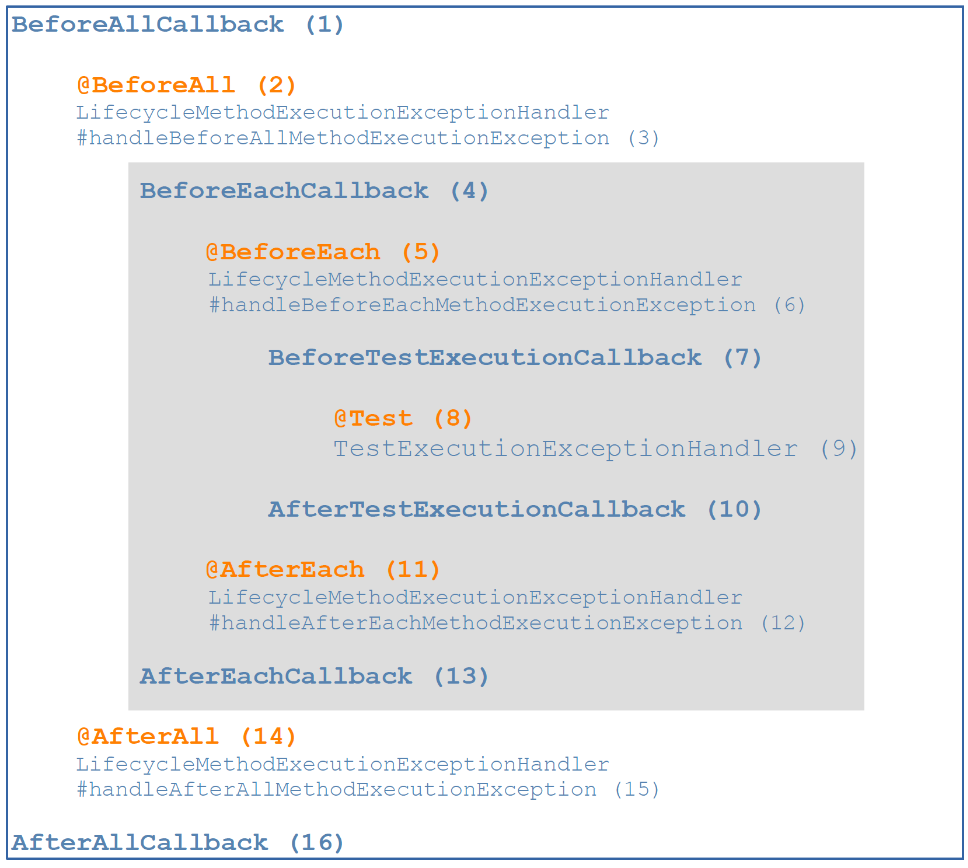
The orange parts are annotation based and are used in the code itself. The blue ones (callbacks) are extensions that are added as a separate file. This extension file is the main demonstration of this page.
What will we need?
In order to use an extension class we will need to do 2 things:
- Create an extension class
- Connect the extension to the test code
Create an extension class
An extension class is a class that implements at least one of the mentioned above callbacks. Here is a basic example:
public class ExampleExtension implements BeforeEachCallback {

    @Override
    public void beforeEach(ExtensionContext context) {
        Report.info("This will be written before each test");
    }
}
That’s it. To see a more complex example of this class, you can take a look at its full implementation here.
Connect the extension to the test code
Actually, it's very simple:
@ExtendWith(ExampleExtension.class)
public class ExtensionsExampleTests {

    @Test
    @DisplayName("Use extensins 1")
    public void useExtensions1() {
        Report.info("Test 1 Starts");
    }

    @Test
    @DisplayName("Use extensins 2")
    public void useExtensions2() {
        Report.info("Test 2 Starts");
    }
}
and the log will show:
This will be written before each test
Test 1 Starts
This will be written before each test
Test 2 Starts